Automated presetter data exchange
Note: unfortunately I no longer have access to my digital files from this project since either I forgot to
or was not permitted to keep them. I did have enough pictures (though none from the shop floor) and handwritten notes to put this together,
but it's not as complete as it could be.
In Summer 2025, I interned at Woodward, Inc. in Santa Clarita, CA under the Manufacturing Engineering department. My main
project was to implement a proof of concept automation for measuring and inputting tool offsets for a CNC machine.
The current workflow for this process is as follows:
- Operator precisely measures tooling using presetting machine
- Operator prints out a label with the tooling information
- Operator manually keys in tool offsets from the label into the CNC control
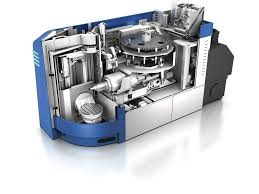
GROB G350 5 axis CNC machine
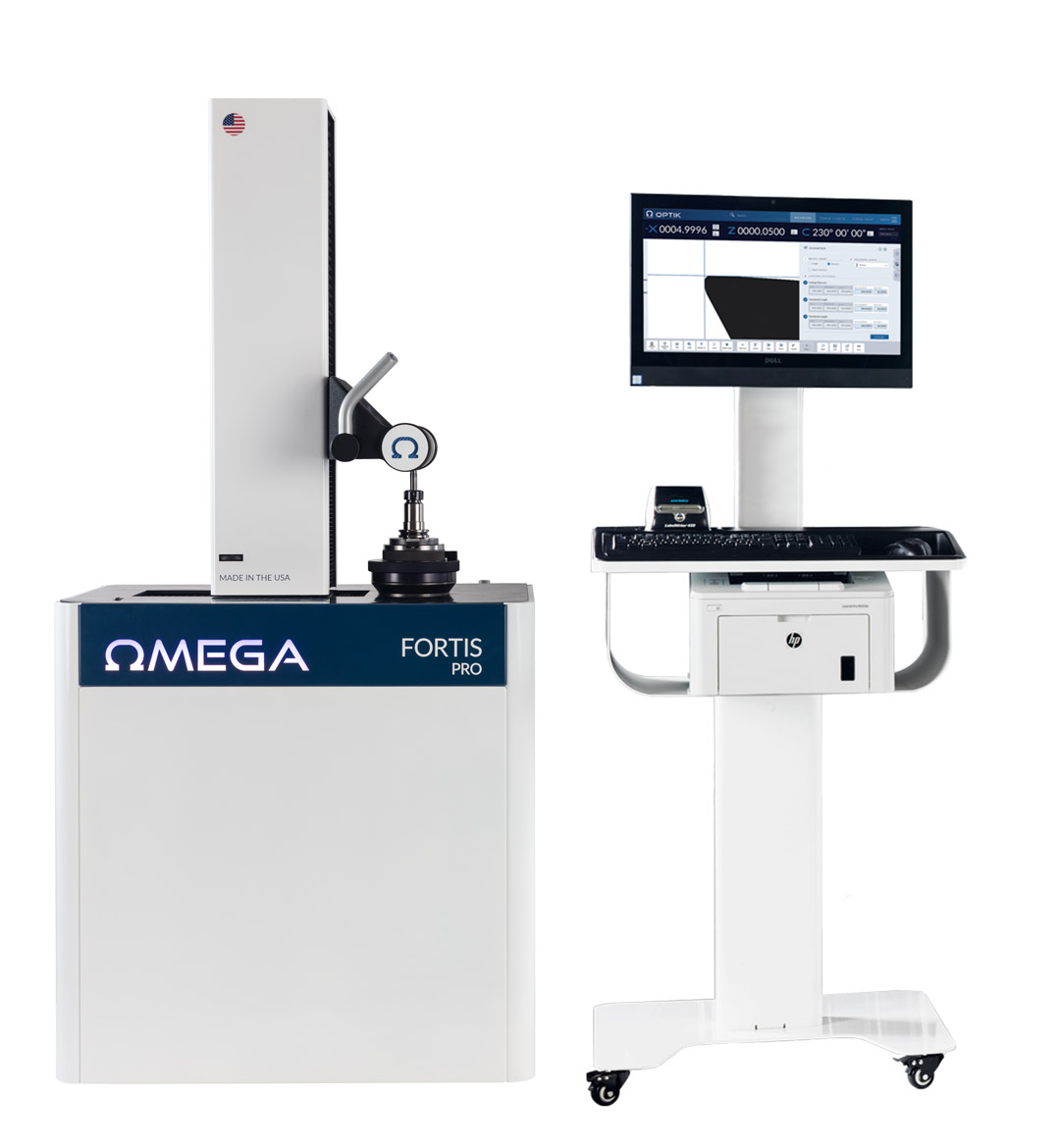
Omega Fortis TMM
Now looking at these fancy modern machines, why are we still wasting $20k a year by doing a manual process?
Both machines are perfectly capable of networking, and have dedicated functionality for this exact purpose.
However, big however, setting it up right is very time consuming and requires a specific solution for each type of machine,
and even each software version, which I had to find out the hard way. I did have some guidance from colleagues at another campus
that had implemented something similar, but other than a general roadmap and sporadic emails back and forth I had to work through unique issues on my own.
The general approach to these kinds of projects is to somehow affix a machine-readable ID to each piece of tooling, so that
associated data can be tied to the tool automatically. This can be done in a few ways: The first, easiest, and most expensive is to
use RFID tags on each tool holder, which can encode all of the measurement data directly, and can be read by an integrated part of
the Grob G350 on loading. The second, cheaper, and more difficult option is to use a barcode or QR code on the tool itself, which
serves as a lookup key to a database of tooling information that must be updated and queried over the network. This has the advantage of being very
cheap to upkeep and expand, but is a major pain to set up in the short term.
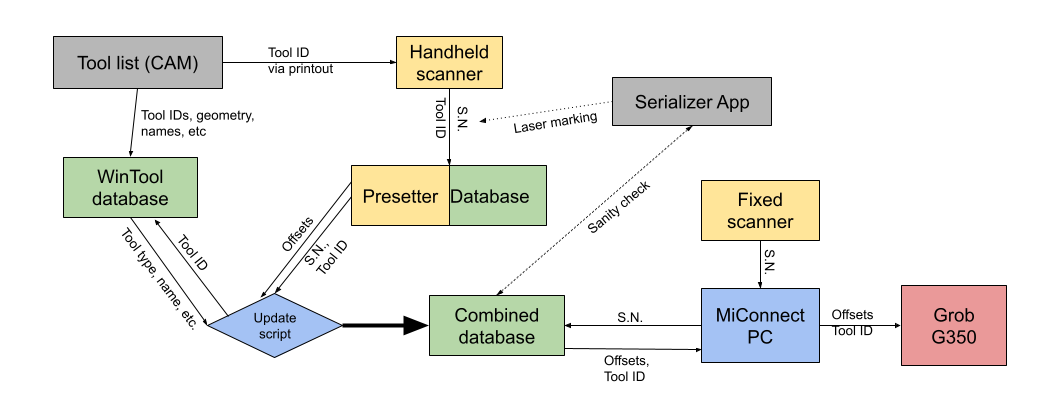
Data flow diagram (from memory)
From all the email exchanges, I put together the above data flow diagram (or something like it), which looks pretty complicated, at least before we break
down the steps.
- First, the CAM programmer creates a tool list for a given part
- He then exports the tool list using WinTool (a tool management software) so that each type of tool and its nominal geometry are stored in a database under a unique ID.
- This ID is printed as a barcode on a physical tool list, which is used by the operator when measureing the tooling to automatically queue the correct measurment program on the presetting machine instead of having to manually select it.
- The presetter also records the serial number of the tool holder, which is used to identify which instance of a tool is being measured
- Just to be clear, WinTool ID represents a model of a specific tool assembly, while the serial number represents a specific instance of a given holder/attached assembly. Kind of like using a lower to identify/serialize several of the same firearm.
- After the actual length and diameter data are measured and determined to be within tolerance, the tooling information (Serial number, WinTool ID, offsets, other WinTool geometry data) are pulled from both the presetter database and the WinTool database by a script running on another server in the network and written to a third database that aggregates all of the tooling information, and only keeps the most recent measurement for each SN.
- Finally, when the tool is ready to be loaded, it is automatically scanned by the fixed scanner attached to the CNC during the loading sequence, which is coordinated by the MiConnect software running on a nearby dedicated PC. MiConnect is necessary to pull data from the scanner and database, and push it to the CNC control, none of which the CNC can handle on its own.
Now you may ask, how are all of these tool holders going to get marked? I decided on using a laser marker to etch the barcode
onto one of the flats on each holder, since that specific flat would be directly facing the mounted scanner in the CNC,
and would provide a good flat surface to etch on and read from. The serial numbers would also have to be prevented from
duplication, since that would cause the wrong measurements to be loaded into the CNC without any obvious errors. To solve this,
I used a spreadsheet with VBA (ugly, I know) to query the main database and see what the lowest unused serial number is, then
export it to a laser marking file automatically. This file can then be directly loaded onto the machine so there is no room
for human error in typing it manually at this step either. Finally, the number is marked as used in the database as a placeholder
before it is actually measured and added.
Laser ready to mark tool

Successful scan event
After all that, the new workflow is as follows:
- Operator scans in tool holder barcode and tool list barcode with a handheld scanner when loading into presetter
- If the tool is not yet marked, the operator must use the serialization spreadsheet to generate a new barcode and use the laser marker to etch it onto the correct flat
- Operator measures tooling using presetting machine and data is pushed to database
- Operator loads tool into CNC machine, the barcode is read by the fixed scanner and the tooling information is automatically loaded into the machine via MiConect
- MiConnect shows a prompt where the opreator can review the tooling information and confirm that it is correct
- Tool is successfully loaded
No more errors. Now of course the cost of this system is not insignificant, but it's about equal to the first year's savings,
and can be easily implemented on more machines for the same savings at much lower cost since the main cost is the initial setup
and one-time purchases of software licesnses and equipment.